
It is rarely the case that a sequel of anything is any good – but I’ll try to buck the trend in this case. Less this…

And more this…

Read into that what you will.
So last week I got the repo whipped-up and stuck a single, solitary test in. But that is pretty basic step. I think some more are needed… so to explore the APIs documented here I used an API client (think Fiddler/Insomnia/ Postman* – and various knock-offs Apidog/Requestly/ Testfully) to explore the requests and responses before implementing any additional tests into the repo – as well as identify the right tests.
*I am not a Postman fanboy by any means – I don’t feel that strongly about any tool – nevertheless I can’t help but experience a sense of deja vu looking at the tools on the market. Is it the perfectly designed tool?! Or so widely adopted that the competition have abandoned creativity and are just emultating them?! They say imitation is the sincerest form of flattery don’t they…
So now that that diatribe is concluded, here is what I did next…
- I thought – there are many more endpoints defined in the pokeapi documentation. What are they?
- But my eyes hurt… plus that is slow, painful, and manual. In the olden days I might write a python scraper to extract data, but I would spend longer on the scraper than manually gathering the info in this case. Is there a better way to generate a list of all the different endpoints groups by method (GET/POST/PUT etc.)?!

So via the following ChatGPT (free model) the prompt below gave me an exhaustive list:
Review the api endpoints defined here: https://pokeapi.co/docs/v2#pokemon

Return me a list of the different endpoints ordered alphabetically but grouped by method.
While I now have a near exhaustive list of all the API endpoints documented, it turned out that all endpoints used the GET method. I note near exhastive, because in spot-checking the output from Chat GPT I can see that a couple of endpoints located in a separate section of the page have been ommitted. Still, better than nowt for my purposes.
So the first task is to extend the existing API checks on the https://pokeapi.co/api/v2/ endpoint and for the sake of transparency (and so that I can look back at the development of this beastie), I will implement a new test file into the repo. The imaginatively named:
nano test/SecondApiTest.test.js
This not only creates the file above, but it also opens the terminal-based text editor.
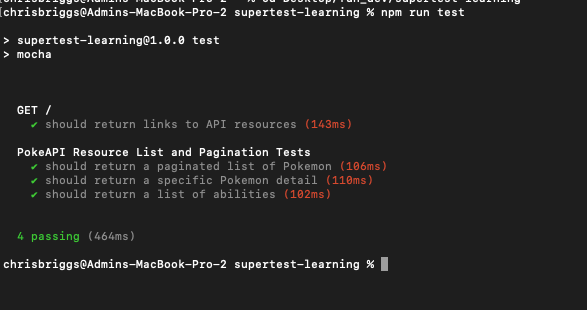
Now before I added any tests I also thought to myself, ‘Chris, you have a payload example. You have ChatGPT. If the goal is just to have a basic suite of assertions, why not prompt ChatGPT and see what comes out?!’. So, dearest gentle reader, that is exactly what I did. Every line below was the result of ChatGPT and after a quick scan to check there was nothing malicious in there, I executed it:
import request from 'supertest';
import { expect } from 'chai';

const baseUrl = 'https://pokeapi.co/api/v2';

describe('PokeAPI Resource List and Pagination Tests', function () {

  it('should return a paginated list of Pokemon', async function () {

    const response = await request(baseUrl)
      .get('/pokemon?limit=20&offset=0')
      .expect(200);  // Status code 200 for success

    // Assert response body structure
    expect(response.body).to.be.an('object');
    expect(response.body).to.have.all.keys('count', 'next', 'previous', 'results');

    // Validate count
    expect(response.body.count).to.be.a('number');

    // Check next and previous are either null or strings
    if (response.body.next !== null) {
      expect(response.body.next).to.be.a('string');
    }
    if (response.body.previous !== null) {
    expect(response.body.previous).to.be.a('string');
    }

    // Assert results is an array
    expect(response.body.results).to.be.an('array').with.lengthOf(20);

    // Assert each result item has name and url properties
    response.body.results.forEach(item => {
      expect(item).to.be.an('object').with.keys('name', 'url');
      expect(item.name).to.be.a('string');
      expect(item.url).to.be.a('string').and.satisfy(url => url.startsWith('https://'));
    });
  });

  it('should return a specific Pokemon detail', async function () {
    const response = await request(baseUrl)
      .get('/pokemon/ditto')
      .expect(200);  // Status code 200 for success

    // Assert response body structure
    expect(response.body).to.be.an('object');
    expect(response.body).to.have.property('name', 'ditto');
    expect(response.body).to.have.property('id').that.is.a('number');
    expect(response.body).to.have.property('abilities').that.is.an('array');
    expect(response.body.abilities[0]).to.have.property('ability').that.is.an('object');
    expect(response.body.abilities[0].ability).to.have.property('name').that.is.a('string');
    expect(response.body.abilities[0].ability).to.have.property('url').that.is.a('string');
  });

  it('should return a list of abilities', async function () {
    const response = await request(baseUrl)
      .get('/ability?limit=10')
      .expect(200);

    // Assert response body structure
    expect(response.body).to.have.all.keys('count', 'next', 'previous', 'results');
    expect(response.body.results).to.be.an('array').with.lengthOf(10);
    response.body.results.forEach(ability => {
      expect(ability).to.have.property('name').that.is.a('string');
      expect(ability).to.have.property('url').that.is.a('string');
    });
  });

});
Well, that all looks quite nice. But what if you want to see the request and the associated responses. What if you want to log out the payload for manual review?! Particularly valuable when tests break and you need to troubleshoot your way through flow to determine whether a righteous fail or not.
console.log('Request: GET /pokemon?limit=20&offset=0');
console.log('Response:', JSON.stringify(response.body, null, 2));
If you pop those lines into your test.js file, now you end up being able to see what is going on under the hood. Now you can see both the request and the response:

Not pretty by any means – but it shows you what is going on.
Depending on your use case(s) you might want to generate log files with request & responses captured. You might want to suppress logging by default but pass through an argument in the CLI to turn logging on. You might want to beautify the logging so that in the event of a schema change you can more readily identify where the bracket/dot notation should be updated in your assertion.
The world is your oyster.
But none of that will be addressed in this post. More to come later…
Instead, I am off to begin sanding some wardrobes before up-cycling can begin in earnest.






 Testers Always Be Testing by Chris Briggs
Leave a comment