
…a voyage of discovery.
You might wonder why Ken Dodd has made an appearance as the ‘featured image’ for this post. I thought a touch of whimsy might brighten things up a bit.
If you are looking for an authoritative blog post on using Supertest for all your sophisticated API test needs, go somewhere else.
This is just a place where I am capturing and sharing my learnings – and if you are just embarking on your Supertest API Journey (or you enjoy correcting other people and explaining to them how they could do everything better…) perhaps maybe, some of it will be for you!

Getting Started
You can following along with this repo: https://github.com/needForSp33d/supertest-learning
Assumptions:
That you are familiar with git, node.js, mocha, chai, and api testing concepts. If I refer to the ‘CLI’ you should also know what this is.
So…

First up you must prepare your… ‘Package‘:
Initialise git & npm into your repo directory:
git init
npm init -y
That ‘ -y ‘ argument, just answers ‘yes’ to all the installation questions by default. If you need something more nuanced you probably won’t pass this… but you also probably wouldn’t be reading this post.
If you checkout your package.json file, you will note that it is practically empty and highly basic:
{
"name": "fun_dev",
"version": "1.0.0",
"main": "index.js",
"scripts": {
"test": "echo \"Error: no test specified\" && exit 1"
},
"keywords": [],
"author": "",
"license": "ISC",
"description": ""
}
So, in order to turn this into a useful package, you need to install some dependencies.
That way when you install the repo onto a new machine – or you share it with someone else – they will just be able to clone it, and run the npm install command and everything that is needed to run the application will be there and ready for you.
To get started you want to install the following:
- supertest
- mocha
- chai
This is your command:
npm install supertest mocha chai --save-dev
You’ll notice a common pattern in ‘npm’ install commands here:
‘npm’ – to initialise the ‘node package manager’
‘install’ – the command
‘supertest mocha chai’ – the three packages being installed
‘–save-dev’ – a totally optional argument that ensures these three packages get saved to the package.json file (along with the version) as a ‘dev dependency’. Like below:
{
  "name": "supertest-learning",
  "version": "1.0.0",
  "description": "A practice repo for all things supertest",
  "main": "index.js",
  "scripts": {
    "test": "echo \"Error: no test specified\" && exit 1"
  },
  "keywords": [],
  "author": "",
  "license": "ISC",
  "devDependencies": {
    "chai": "^5.1.2",
    "mocha": "^11.0.1",
    "supertest": "^7.0.0"
  }
}
Now you have something almost useful all of the 100+ packages that have been installed are defined in your package-lock.json file – a file too voluminous (and painful) to display here.
Still – this ain’t a test – right? I feel that I really can’t press the button until there is a functioning test…

So, assuming you are doing everything in the CLI you should probably write-up a wee file structure and create a test file:
mkdir test && touch test/firstApiTest.test.js
If you hadn’t gathered by now, I am using a Unix machine. If you are using a Windows OS I would re-evaluate my choices.
Get into the text editor like so:
nano firstApiTest.test.js
Admittedly the editor is pretty basic – but it will give you all you need too:

Once you’re written a basic check confirming a 200 response and that the response body provided is an object, you might end up with something like this:
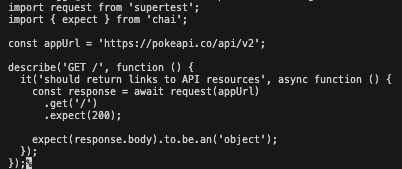
In this example I’m calling a one of the Pokeapi endpoints – turned 10 years old on the 4th of December!
Before you can execute a test, you need to update the package.json file one final time so that when you pass the npm test command, something beautiful can happen.
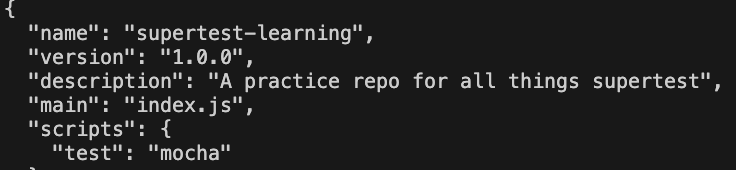
Now from the repo directory in the CLI execute the following:
npm test
The magical output that you receive pretty darn quickly is:

Break this down though, ocne the npm test command has been entered this performs the following:
- The ‘test’ script defined in the
package.jsonfile is executed. - Supertest & mocha are initialised.
- By default, all tests in the ‘test’ folder will be executed (not an issue right now – but if there are loads of tests, or the use case requires targetted testing, this will have to be refined).
- The ‘describe’ block for the ‘GET /’ endpoint above is executed and the nested ‘it’ blocks are executed.
- In order for this single test to pass, two explicit conditions must be ‘true’:
- the http status code must = 200.
- the response body must be an object type.
Phew, my first Supertest test. Well, that was fun. Tatty bye for now!




 Testers Always Be Testing by Chris Briggs
Leave a comment